DocumentationExporting
The export check
What is checked before a file is written, what each finding means, and which ones a store will actually refuse.
Before writing a file, the book is checked against two things: its own facts, and the published rules of every destination on the Export screen, ticked or not. Each destination shows the result beside its name — Ready, 2 to fix, 1 to check — and the ticked ones list their findings.
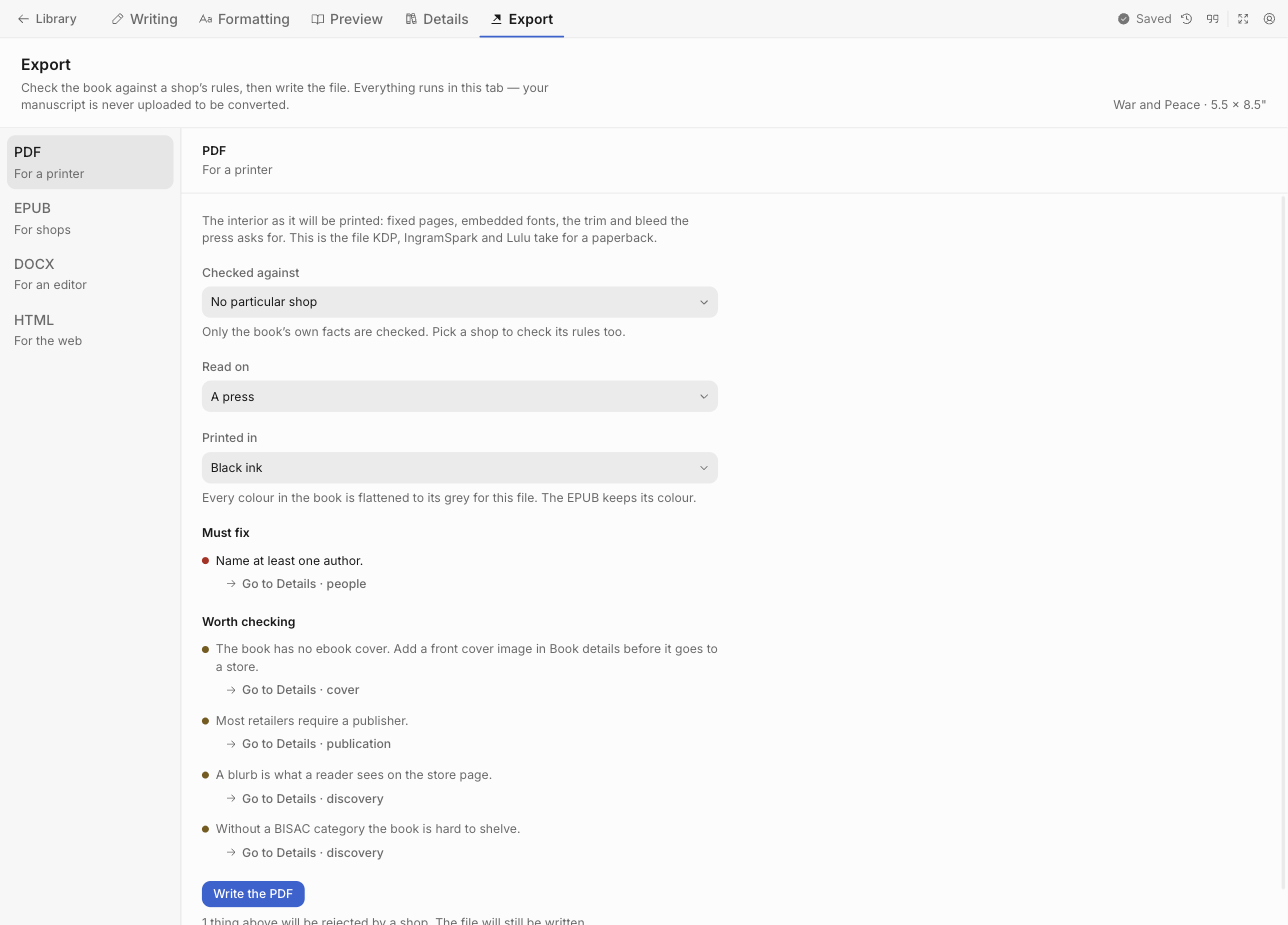
Three headings
| Heading | Means |
|---|---|
| Must fix | The store will refuse the file |
| Worth checking | Probably fine, but look at it |
| For information | A fact about what the export did |
Findings that carry a fix
Some findings have a button that applies the correction:
| Finding | Fix offered |
|---|---|
| The page has no bleed, and this profile requires some | Set the bleed to the required value |
| The inside margin is below the minimum for this page count | Widen the gutter |
| This destination does not accept interior bleed | Remove it |
| The language is typed as a name — english, français | Set the language to its tag, en or fr |
The rest link to the exact screen and field: Go to Details · people, Go to Formatting.
What is checked
The book’s own facts
- A title that is not still Untitled
- At least one author
- A valid ISBN check digit
- A language that is a real language tag
- A cover image — an error for EPUB, a warning for PDF
The store’s rules
| Check | Typical finding |
|---|---|
| Trim size | The page is 152.4 × 228.6 mm, which this profile does not offer. The closest it does offer is… |
| Bleed | This profile requires 3.2 mm of bleed, and the page has none. Only a book with artwork reaching the edge is asked |
| Inside margin | Below the minimum for this page count |
| Page count | Black ink on cream paper at 152.4 × 228.6 mm takes 24 to 776 pages, and this book is 800 |
| Ink, paper and trim | Standard colour on white paper at A4 is not a combination this destination prints |
| Type size | A press that prints nothing under 7 pt, checked against every text style in the design |
| Crop marks | Refused by KDP, IngramSpark, Lulu and PublishDrive; reported if the export was asked to draw them |
| Press standard | The PDF/X flavours the press accepts — IngramSpark takes X-1a or X-3 |
| Image resolution | Below 300 DPI, or below the resolution the store refuses at |
| Image size | Over the pixels a reading device accepts — resized for you unless you chose As uploaded |
| File size | Over the limit the store accepts. Checked after the file is written, and reported with it |
| Fonts | Not embedded, where the store requires embedding |
| Print cover | Missing, or sized for a page count the book has since outgrown |
Accessibility
EPUB only. Each finding links to the block it is about.
| Finding | Fix |
|---|---|
| A picture has no description | Write one in the figure’s Alt text |
| A heading skips a level | Change its level: level 2 after level 1, not level 3 |
| A large table has no header row | Mark its first row as a header row |
| A colour has too little contrast | Darken the text colour in Formatting |
These are Worth checking. A store accepts a book with them, but will not list it as accessible, and the EPUB only declares accessibility when none remain.
The page itself
Two checks that are about the design rather than the store:
Page numbers overlapping text. If the folio sits closer to the trim than the margin allows, it prints over the last line. The finding gives all four numbers: “The page number sits 12 mm from the bottom edge, and the bottom page margin is 14 mm — leaving 2 mm for a number that needs 4.”
A stale print cover. The spine width comes from the page count; if the book has grown since the cover was made, the cover no longer fits.
Findings worth understanding
Body text at the reader’s size
Not a finding, but a line under the Kindle and Apple Books destinations. Those stores require the ebook’s body text to use the reader’s own size, and the file is written that way: your printed book keeps the size you set; the EPUB uses the reader’s. Kindle also leaves line spacing to the reader, which is what keeps your embedded fonts — Kindle removes fonts from a book that overrides the reader’s settings. Apple allows line spacing as a multiple of the reader’s size, so an Apple file keeps yours. Nothing to change.
“Nueel has not confirmed that every font may be embedded”
A warning, not an error. It means the font’s licensing could not be read, not that embedding is forbidden. Fonts that ship with the studio never produce it.
“A picture has no description”
A screen reader reads the description in place of the picture. One sentence saying what the picture shows is enough. A decorative ornament can stay blank.
Image resolution reported for an ornament
An ornament is a picture, and it prints at whatever width the design sets — usually 25 mm. A 25 mm ornament from a small file can print at 68 DPI, well under any printer’s floor, so ornaments are checked alongside the pictures you placed yourself.
After the export
The PDF is inspected after it is written, and reports what it found: fonts embedded or not, the TrimBox verified at the size you asked for, the page count matching what was composed.
The EPUB reports what was done to the pictures, whether the accessibility check passed, and whether the file is over the store’s size limit.